Every Feature You Need. Nothing You Don't.
From visual workflows to exotic data formats to carrier-grade deployment—layline.io gives engineering teams the tools to build real-time data pipelines without the bloat.
Built for Real-World Pipelines
Everything you need to build, deploy, and monitor production-grade data pipelines
Visual Workflow Development
Build complex pipelines with drag-and-drop simplicity
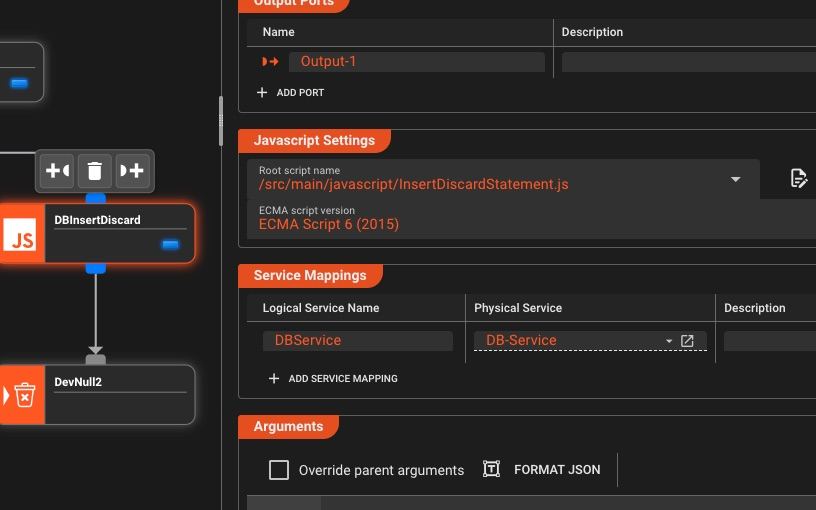
Intuitive Drag-and-Drop Canvas
Build workflows visually by connecting processors—accelerate development with zero-code configuration, drop into custom scripts when needed
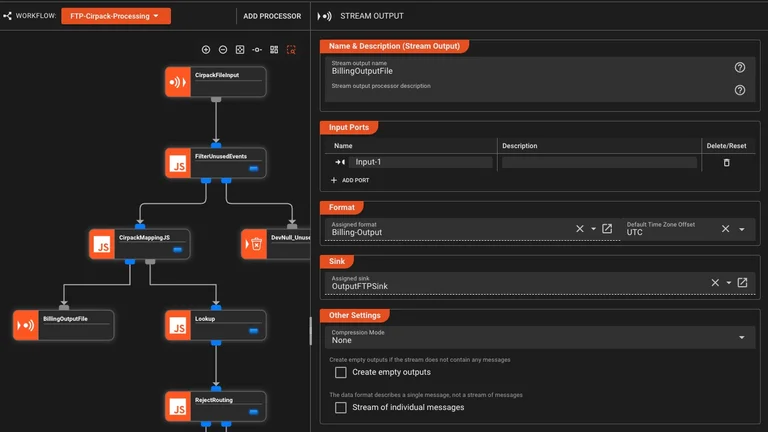
Real-Time Validation
Catch configuration errors as you build—before deployment
- Instant syntax checking
- Schema validation
- Dependency detection
- Error highlighting
Version Control Ready
Configs stored as JSON and scripts—track changes, branch, merge with any version control system
Reusable Assets
Create modular, reusable components that can be used as processors or referenced by other processors—build once, use everywhere
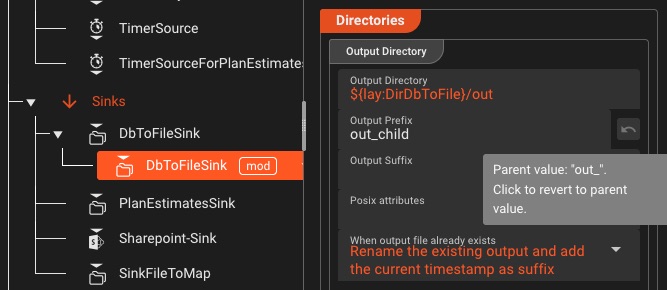
- Asset inheritance for easy maintenance
- Derive Assets from one another
- Shared across workflows and projects
Custom Templates
Create your own workflow templates and share them across projects and teams
- Save workflows as reusable templates
- Share across projects and teams
- Export entire projects or parts for reuse
Build once, deploy everywhere—across environments and teams
Browser-Attached Debugging
Attach your browser debugger to Python or JavaScript code and use the full power of modern dev tools
- Step-through execution and conditional breakpoints
- Watch expressions, scopes, and call stacks
- Message inspection at each stage with live variables
- Error stack traces with source mapping
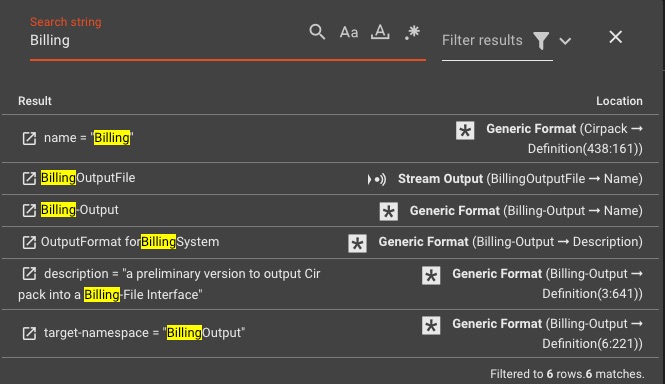
Workflow Search & Navigation
Quickly find and navigate through processors, configurations, workflow elements and scripts
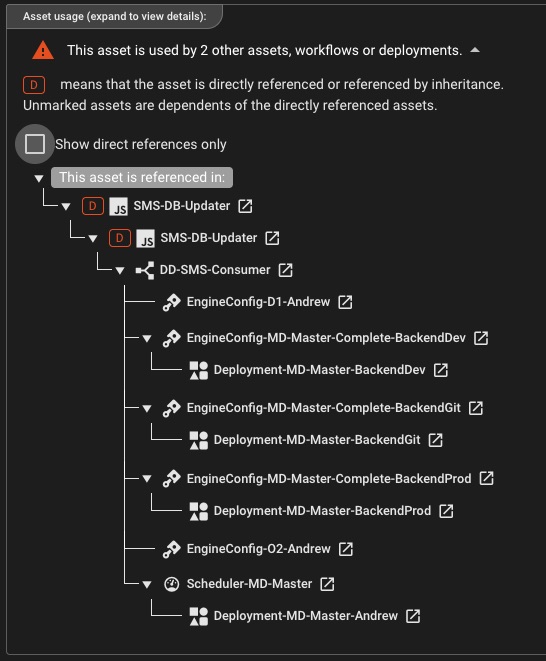
Asset Dependency Visualization
Understand how assets, workflows, and deployments are connected throughout your project
Team Collaboration
Share workflows and collaborate with role-based access control
- Granular access control
- Concurrent project editing
- Project change notifications
Universal Data Connectivity
Universal protocol support for any data source and destination
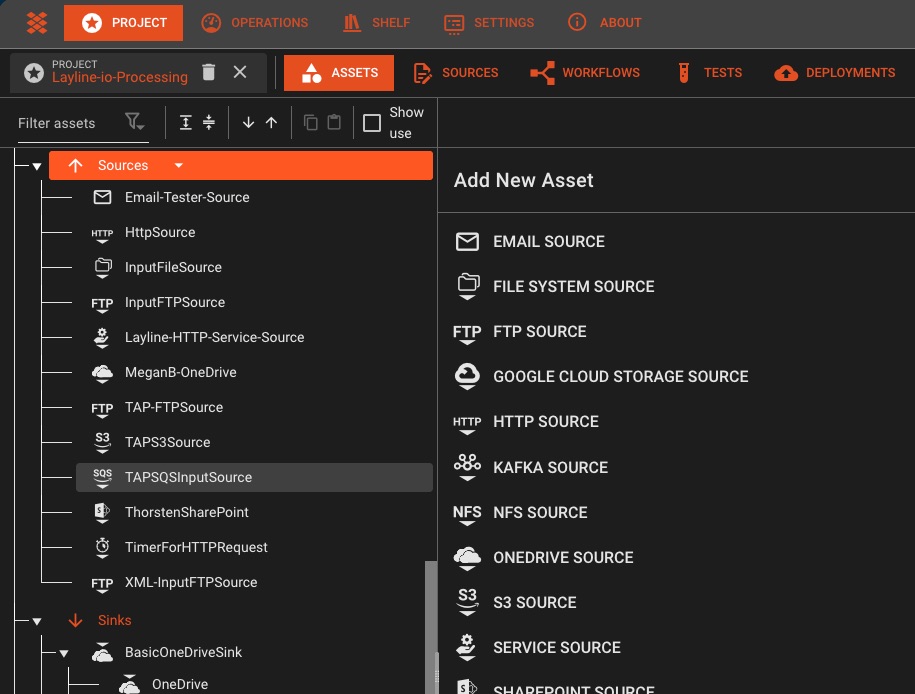
Streaming Platforms
Kafka, AWS SQS & SNS, UDP, Azure Event Hubs, and more—all with native support
- • Consumer groups
- • Exactly-once semantics
- • Batch processing
- • Kinesis Data Streams
- • SQS & SNS messaging
- • S3 event notifications
Database Connectors
Read and write to any database with change data capture support
- PostgreSQL, MySQL, SQL Server
- MongoDB, Cassandra, Redis
- Elasticsearch, DynamoDB
- AWS Keyspaces
- Hazelcast
- GCS
- Sharepoint
- more ...
Change Data Capture
Built-in Debezium source asset for reliable, observable CDC pipelines
- Debezium-powered CDC
- Native backpressure handling and unified retry
- Visual pipeline design with CDC as first-class citizen
REST APIs & Webhooks
Call any HTTP endpoint with built-in retry, circuit breaking, and authentication
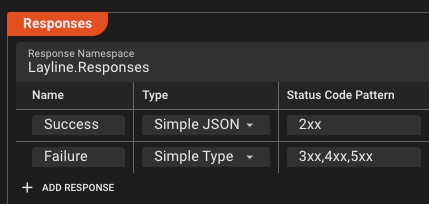
- OAuth 2.0, API keys, JWT
- GraphQL queries
Cloud Native Services
Deep integration with AWS, Azure, and Google Cloud
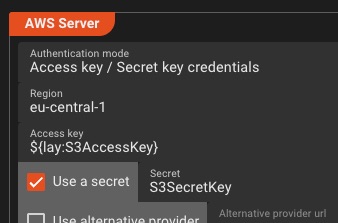
- S3, Azure Blob, GCS
- SNS/SQS, Service Bus
- CloudWatch & App Insights
- IAM & managed identities
Enterprise File Sharing
Access corporate file shares and cloud document repositories
- SMB/CIFS network shares
- NFS (Network File System)
- WebDAV protocol support
- Virtual file system abstraction
Microsoft 365 Integration
Deep integration with SharePoint, OneDrive, and Microsoft Graph API for enterprise collaboration
Network Protocols
Low-level network access for custom protocols and real-time data streaming
- TCP/UDP source & sink support
- Raw socket handling
- Custom protocol implementation
- Binary data streaming
Email Integration
Trigger workflows from emails and send notifications with attachments
- IMAP/POP3 email sources
- SMTP email delivery
- Attachment processing
- Multi-mailbox monitoring
Timer & Scheduled Sources
Trigger workflows on schedules, time windows, or recurring intervals for batch processing and periodic tasks
Complex scheduling patterns with full cron support
Simple interval-based triggering from seconds to months
Define specific time windows for batch processing
File Systems & Legacy Protocols
Process files from local drives, network shares, FTP/SFTP servers, or cloud storage—with automatic polling, pattern matching, and move-after-processing
Data Formats & Parsing
Parse any format from JSON to legacy telecom protocols
Standard Formats
Native support for the data formats you already use
- ASN.1
- XML
- CSV, TSV, delimited files
- Any structured ASCII, binary or mixed formats
- Fixed-width records
Universal Format Configuration
Define any custom data format—CSV, hierarchical ASCII, binary, or mixed structures—with a powerful grammar-based configuration language
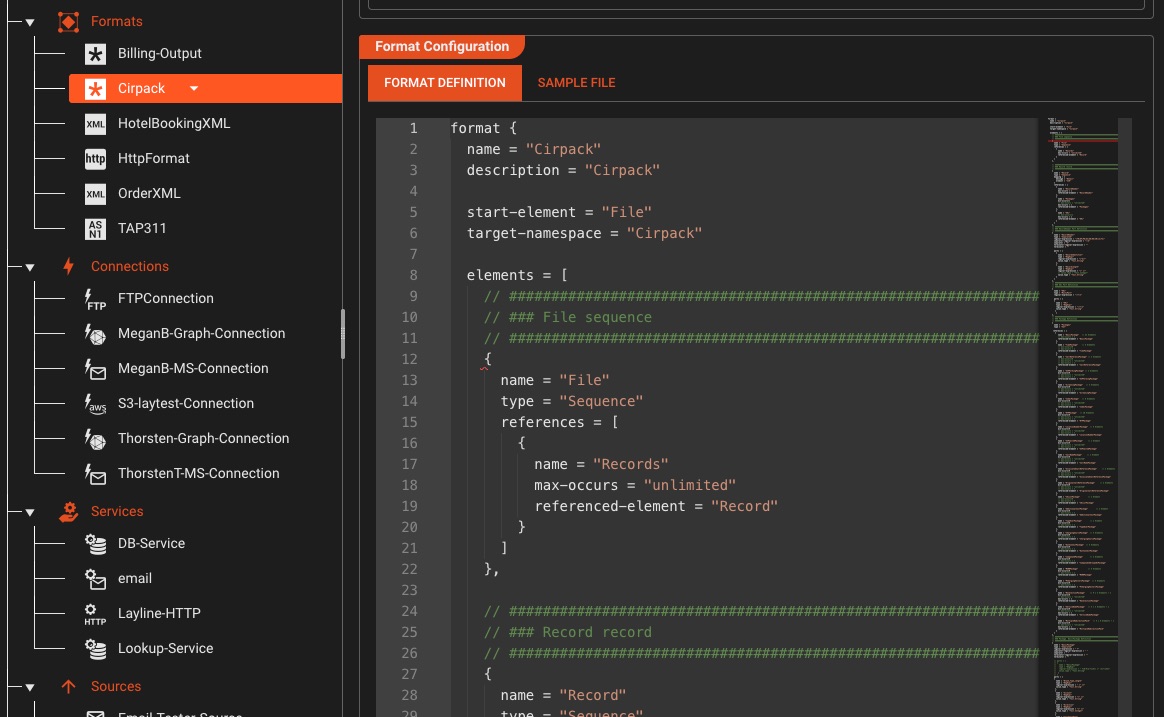
Define formats using regular expressions and hierarchical structures
Upload sample files and test your grammar in real-time
Use the same grammar for both parsing input and generating output
Real-time syntax validation and error highlighting in the editor
ASN.1 & Telecom Protocols
Unique CapabilityIndustry-leading ASN.1 parsing for telecom CDRs, SS7, TCAP, MAP, and legacy protocols—capabilities you won't find in generic ETL tools
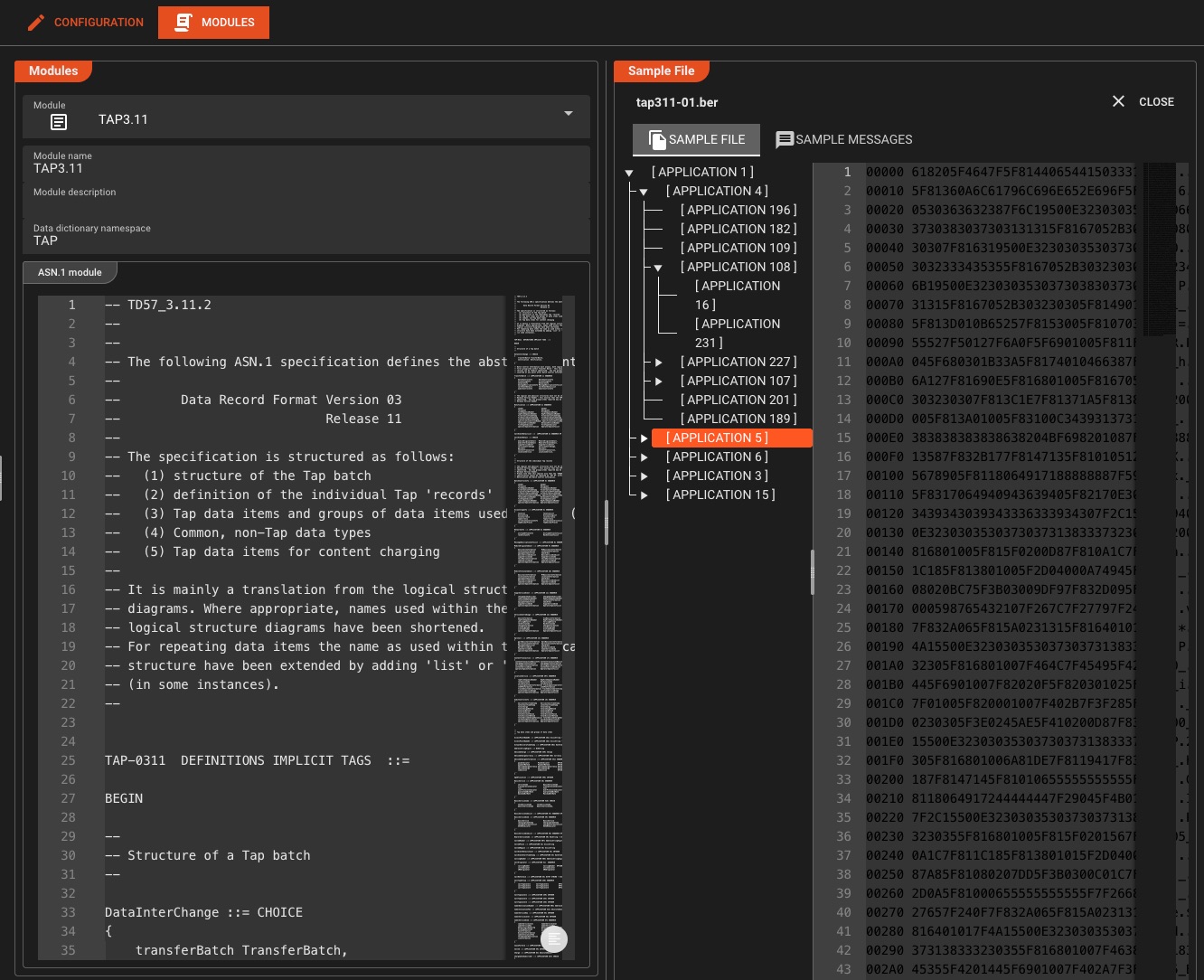
Supported Standards
Use case: Process billions of telecom CDRs daily with sub-millisecond parsing
Data Dictionary
Type SystemDefine custom data structures and types that can be reused throughout your workflows—with full support for encoding/decoding to external formats like JSON
Custom Types
Define Sequences, Arrays, Enumerations, Choices, and Namespaces
Type Reusability
Reference types across formats and workflows for consistency
Message Augmentation
Add derived or enriched data to messages at runtime
Format Integration
Reference types from any format—Generic, ASN.1, or other Data Dictionaries
Format Transformation
Apply transformations to convert between any format
- Field mapping & restructuring
- Data type conversions
Custom Binary Formats
Define your own binary structure parsers with precision
- Bit-level field extraction
- Nested structures
- Conditional parsing
Validation & Quality
Catch malformed data before it corrupts your pipeline
- Schema validation
- Custom validation rules
- Error enrichment
Native Format Processing
Game ChangerUnlike traditional ETL tools that force you to map external formats to fixed internal schemas and back, layline.io works directly with your data in its native format—eliminating unnecessary transformation overhead
Traditional ETL Systems
- •Map external format to fixed internal schema on read
- •Process data in generic internal representation
- •Map internal schema back to target format on write
- •Double transformation overhead and complexity
layline.io Approach
- Parse data directly into native format structure
- Work with data in its original structure throughout
- Data dictionary dynamically created from your formats
- Extend with custom structures as needed—no mapping
Why This Matters
Business Logic & Transformation
Embed custom logic for enrichment, routing, and complex transformations
Error Handling & Retry
Handle failures gracefully with configurable retry policies and dead letter queues
- Configurable retry policies
- Exponential backoff strategies
- Dead letter queue routing
- Circuit breaker patterns
- Error categorization
JavaScript & Python Scripting
Embed custom code directly in your workflows—full language support, not limited sandbox
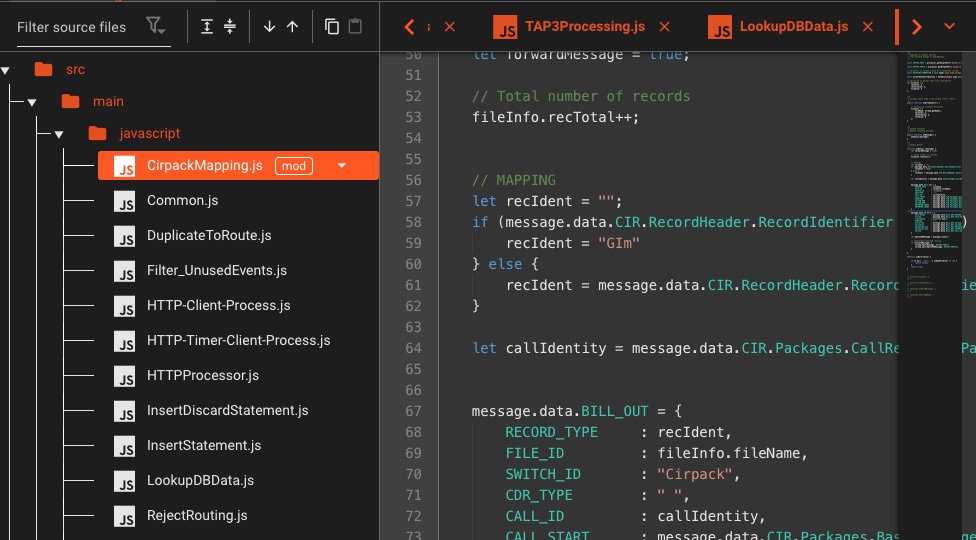
💡 You can also use your favorite IDE for scripting purposes
- Async/await support
- Import/Exports
- Lifecycle hooks
- Use Javascript/Python interchangeably
Field Mapping
Transform and map data fields between different formats and schemas
- Visual field mapper
- Nested field access
- Conditional mappings
- Type coercion
- Default value handling
Data Enrichment
Augment events with external data from APIs, databases, or caches
- Access service sources anywhere within the pipeline
Routing & Filtering
Define your own rules with individual conditions—a very flexible processor suitable for most, if not all, routing and filtering cases. If this isn't sufficient, you can always resort to scripting.
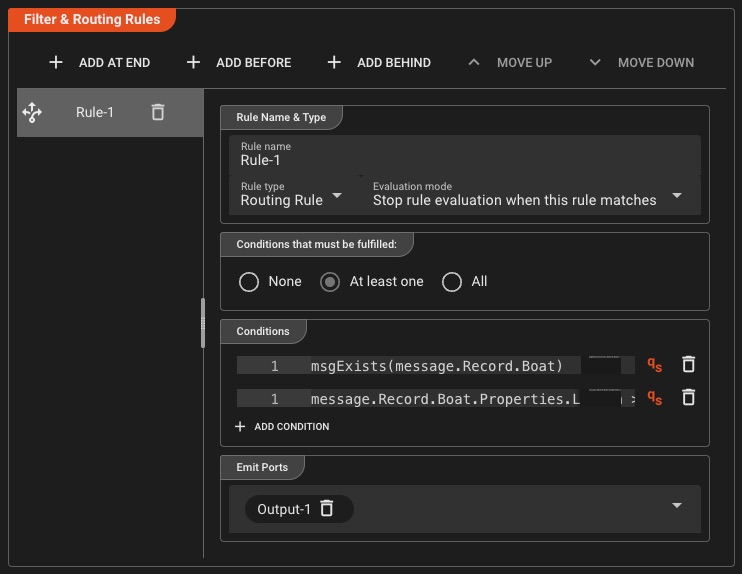
Rule-Based Routing
- Define multiple conditions per rule
- Multi-way routing to different ports
- AND/OR condition combinations
Flexible Filtering
- Content-based filtering rules
- Field value comparisons
- Fallback to scripting when needed
Rate Limiting & Throttling
Control message flow and prevent system overload with intelligent throttling
- Message rate control
- Backpressure handling
- Burst management
- Dynamic throttling
Stateful Processing
Maintain state across events for complex workflows
- In-memory state stores
- Persistent state backends
- Exactly-once guarantees
- Checkpointing & recovery
- Transactional security
Track user sessions, count events, or maintain running totals across millions of streams
Aggregation & Time Windows
Process streams with tumbling, sliding, or session windows for real-time analytics
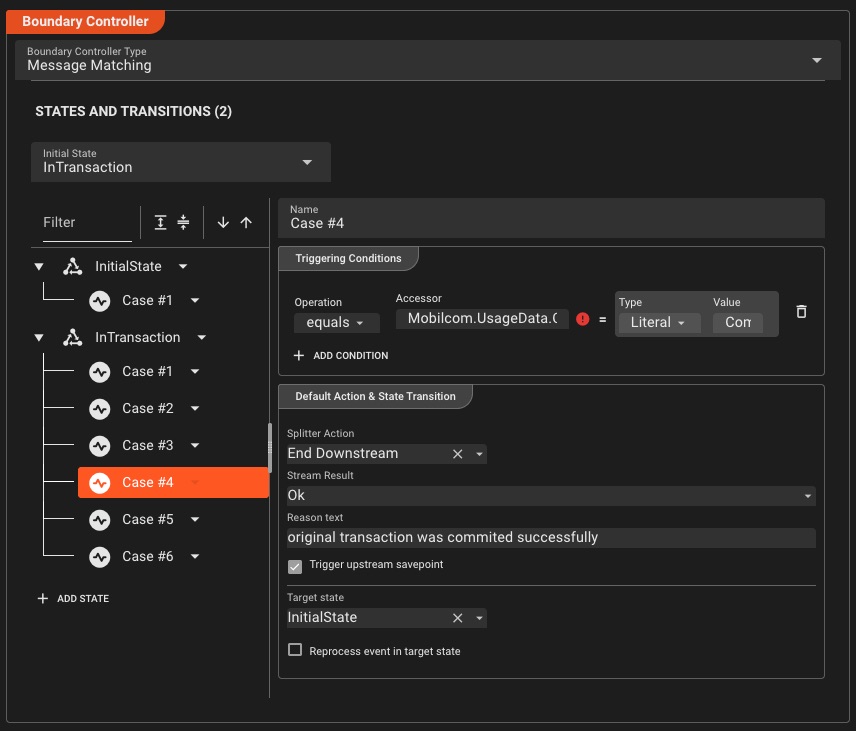
Tumbling Windows
Fixed-size, non-overlapping time buckets
Every 5 minutesSliding Windows
Overlapping windows for moving averages
10min window, 1min slideSession Windows
Activity-based grouping with timeout
30sec inactivity gapUnlimited Flexibility
Using JavaScript or Python, you can define any type of processing logic based on the messages flowing through your processors. Chain one or many processors to implement complete systems—fraud detection, pricing calculation, filtering, transformation, or anything else that comes to mind. Enrich data from external sources, branch and route to specific destinations based on your business logic. You can even use your own IDE instead of relying on the Configuration Center to write your scripts.
Fraud Detection
Analyze transaction patterns in real-time to identify and block fraudulent activity
Dynamic Pricing
Calculate prices on-the-fly based on demand, inventory, and market conditions
Data Transformation
Filter, reshape, and enrich data from multiple sources into unified formats
Real-Time Analytics
Aggregate and compute metrics across streaming data for instant insights
Smart Alerting
Detect anomalies and trigger notifications based on custom business rules
Event Orchestration
Coordinate complex multi-step workflows across distributed systems
These are just examples. The system is not limited to these use cases—implement anything your business requires with full programming language support and lifecycle hooks for streams, transactions, and messages.
Deployment & Orchestration
Deploy anywhere—cloud, edge, or on-prem with zero-downtime updates
One-Click Cluster Deployment
Deploy to any cluster with a single click—no command line, no complex configurations, just intuitive visual deployment management
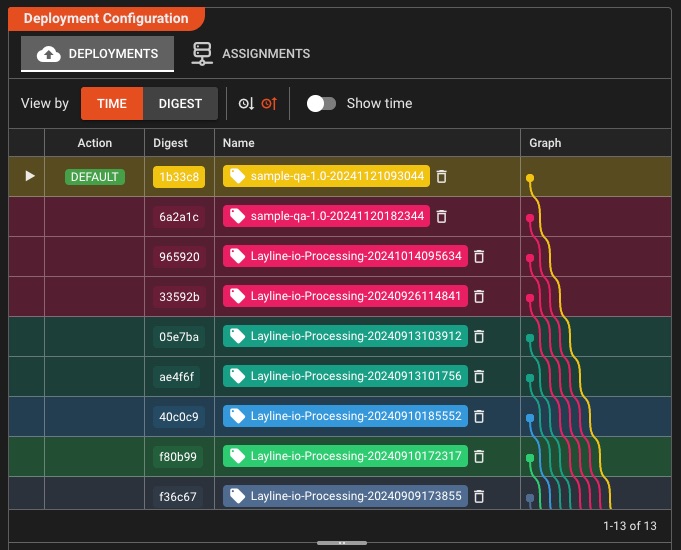
Simplified Deployment
- One-click deployment to any cluster
- Auto-propagation of configurations cluster-wide
- No command line or complex configs needed
- Visual deployment guidance
- Assign deployments to specific cluster nodes
Version Management
- Complete deployment history stored in cluster
- Seamless zero-downtime switchover between versions
- Instant rollback to any previous deployment
- Incremental updates to existing deployments
Docker Containers
Package workflows as lightweight containers
- Docker Compose support
- Multi-arch images (x86/ARM)
- Minimal base images
Multi-Region Mesh
Geo-distributed clusters with automatic failover
- Cross-region replication
- Automatic failover
- Load balancing
- Data locality
Enterprise: Deploy across continents with <10ms sync latency
CI/CD Pipeline Integration
Deploy from CLI with scriptable automation for seamless CI/CD integration
- One-command deployments with flags
- Shell-scriptable for automation
- Exit codes for pipeline integration
Granular Deployment Configurations
Build once, configure many—create reusable deployment compositions tailored for each environment without duplicating workflows
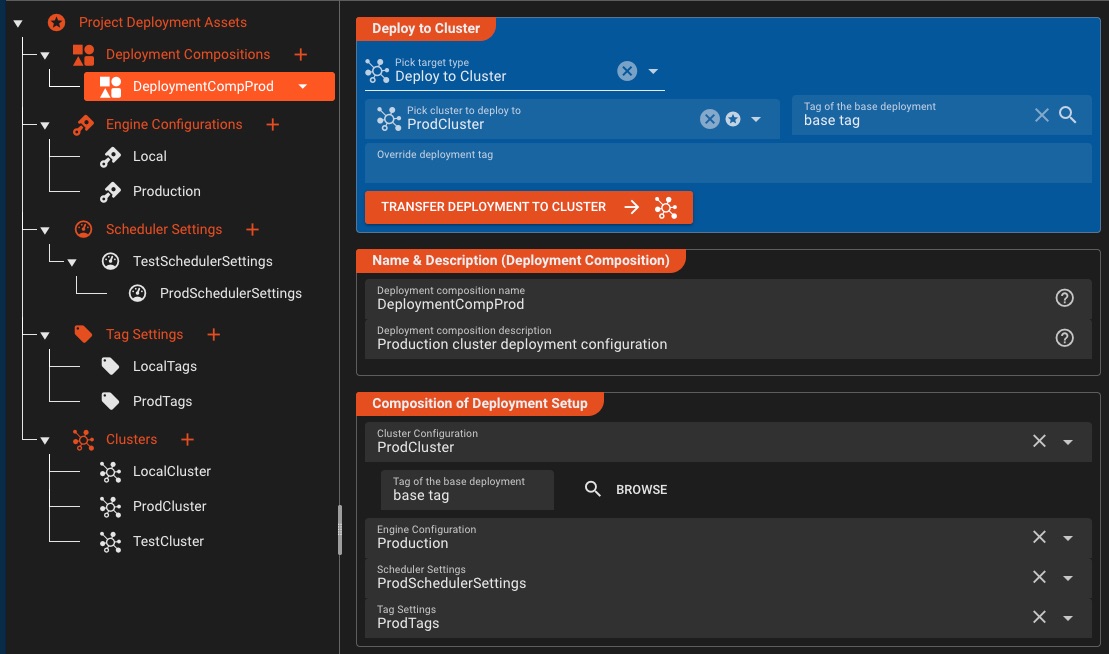
Composable Configurations
- Engine Configurations per environment
- Scheduler Settings for instance control
- Tag Settings for deployment targeting
- Deployment Compositions combine all configs
Environment Flexibility
- Override secrets per environment
- Environment-specific variable overrides
- Pick destination cluster on-demand
- Manage test, dev, prod configs independently
Deploy with precision: Mix and match engine configurations, scheduler settings, and tag configurations to create deployment compositions that fit each environment perfectly—without workflow duplication.
Dynamic Workflow Scheduling
Scale workflow instances on-demand and distribute processing power intelligently across your cluster
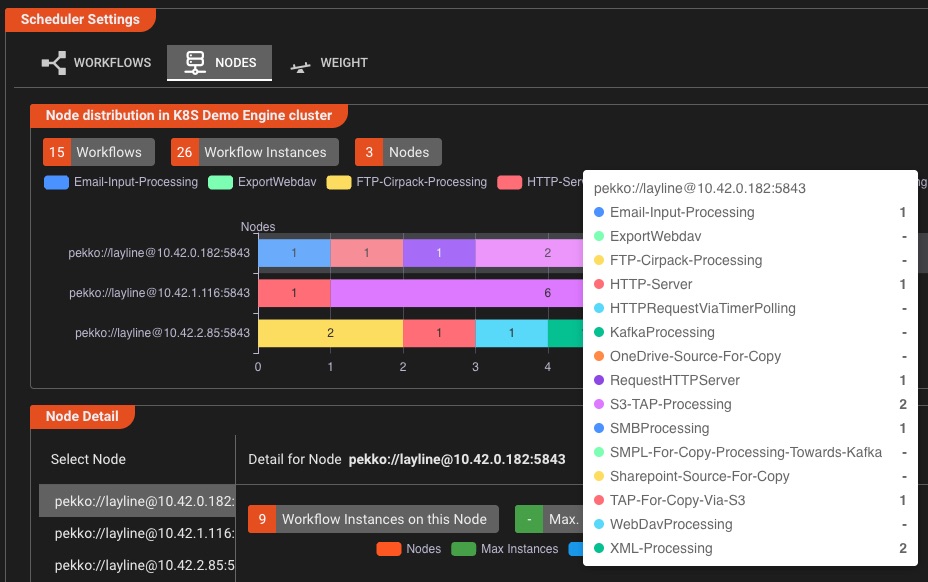
Intelligent Scaling
- Adjust workflow instances with a single click
- Define min/max instance boundaries
- Set processing power priority per workflow
- Real-time scaling without downtime
Cluster Distribution
- Visualize load distribution across nodes
- Pin workflows to specific cluster nodes
- Balance workloads automatically
- Monitor instance distribution in real-time
Scale with confidence: Increase or decrease workflow instances on the fly, assign specific workloads to dedicated nodes, and optimize processing power allocation—all from an intuitive visual interface.
Enterprise Security & Encryption
Zero-trust security with public-private key encryption—shield secrets from developers while maintaining secure access
- Public-private key encryption
- Centralized security storage
- Identity & trusted certificates
- Role-based secret access
- Third-party system authentication
- more ...
Zero-trust by design: Only those with private keys can decrypt secrets—developers stay productive without exposure to sensitive credentials.
Zero-Downtime Updates & Instant Version Switching
Update running workflows without dropping a single event—cluster retains all deployment versions, switch to any with one click
Version Switching
Cluster stores all versions—switch to any with one click
Canary Releases
Route 5% traffic to test before full rollout
Instant Rollback
Revert to previous version in <1 second
Health Checks
Automatic validation before traffic switch
Observability & Debugging
Full visibility into your data pipelines with real-time monitoring and debugging
Real-Time Monitoring Dashboards
Live performance metrics and visual insights for every workflow
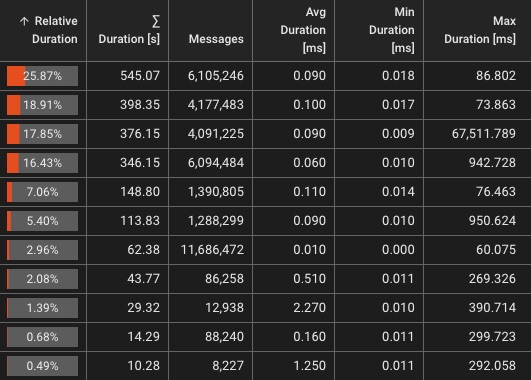
Live Metrics
- Throughput (events/sec)
- Error rates & types
- Message metrics
Visualizations
- Workflow load distribution
- Live Flow diagrams
- Throughput per processor
Message Sniffing
Inspect live data flowing through your pipelines
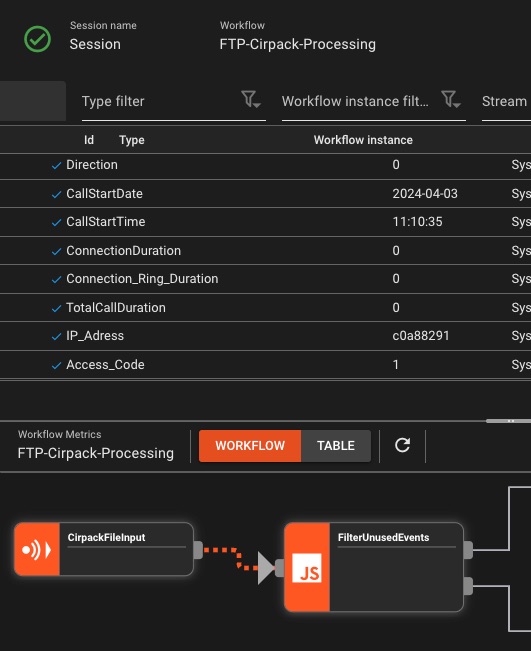
- Real-time message capture
- Filter by content/metadata
- Format-aware display
- Export samples
Pro tip: Sniff at any processor to see transformations in action
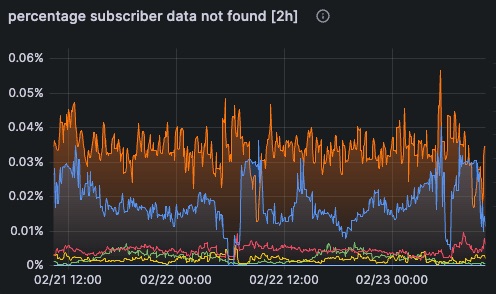
Prometheus Metrics & OpenTelemetry
Industry-standard observability that integrates with your existing stack
Live Engine State Inspector
Drill down from cluster to individual processor ports—see exactly what's deployed and running, without source files
- Hierarchical deployment view
- Workflow-to-node distribution
- Instance count per node
- Processor-level state inspection
- Configuration visibility
- Connection & service status
Production transparency: Inspect what's actually running in production—from workflows down to individual ports—even without project source files. Perfect for troubleshooting and deployment verification.
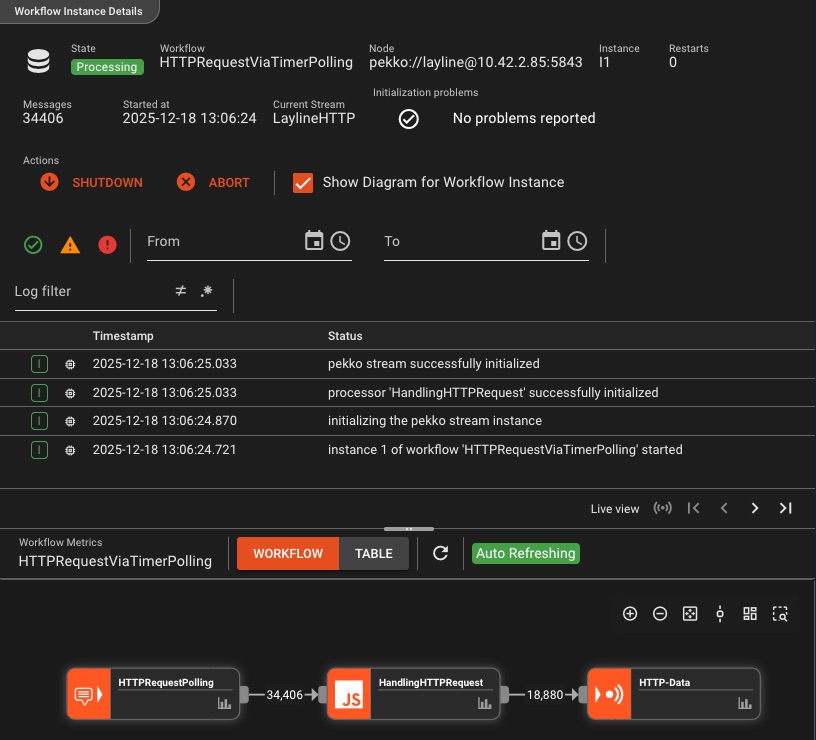
Comprehensive Logging & Audit Trail
Every action, every event, every error—fully logged and traceable with granular per-instance visibility
Granular Visibility
- Per-workflow instance logging
- Stream-level execution details
- Status and state tracking
- Error context and stack traces
Control & Customization
- Custom logging messages
- Start/stop workflow instances
- Filter by severity and source
- Complete audit history
Never lose context: From initialization to shutdown, every workflow action is logged with precise timestamps, enabling rapid troubleshooting and complete operational transparency.
Live Script Debugging in Production
Debug running workflows on any cluster node with breakpoints, step-through execution, and runtime variable manipulation—just like your browser's DevTools
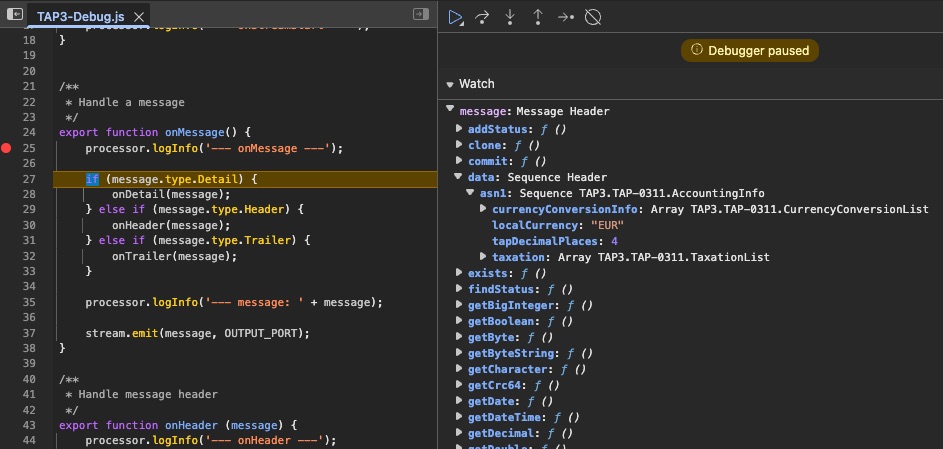
Interactive Debugging
- Set breakpoints in any script
- Step through code line-by-line
- Pause workflow at breakpoint
- Resume or step into functions
Runtime Inspection & Manipulation
- Inspect all variables & message data
- Modify values at runtime
- Test edge cases on-the-fly
- Debug on any cluster node
Production-grade debugging: Attach to live workflows, set breakpoints, and inspect real messages as they flow through your pipeline—without redeployment. Change variables on-the-fly to test fixes instantly.
Interactive Service Function Testing
Test service functions in isolation—execute database queries, send emails, or call APIs directly from the dashboard without running workflows
- Execute functions interactively
- Fill parameters on-the-fly
- Instant result validation
- Test DB queries live
- Validate any service function
- No workflow required
Test smarter, not harder: Why rebuild and redeploy entire workflows just to verify a database query or any other service function? Test service functions independently, iterate rapidly, and ship with confidence.
Smart Alerts & Notifications
Get notified when things go wrong—before your users notice
Threshold Alerts
Trigger on latency, error rate, throughput anomalies
Workflow Health
Stream status, instance failures, node availability
Dynamic Targets
Define alarm targets on-the-fly: email, Teams, etc.
Custom Alert Rules
Create templates, rules, and target groups
Integrates With Your Stack
Standards-based integration with popular tools and protocols
Explore Further
Learn more about use cases, pricing, and how layline.io fits your needs
Product Overview
Discover layline.io's reactive architecture, platform capabilities, and technical foundations
Learn MoreIndustry Solutions
See how teams in finance, telecom, ecommerce, and more use layline.io
Explore SolutionsFeature Deep Dives & Tutorials
Explore how to make the most of layline.io's powerful features

Data Products Fail When Nobody Owns the Runtime
Teams love calling their outputs 'data products.' But renaming a dashboard doesn't make it a product. The real test is who gets paged when it breaks at 2 AM — and whether they have the authority to fix it.

dbt Is Leaving the Warehouse. Are Your Pipelines Ready?
dbt built the modern analytics workflow. Now the transformation layer is moving upstream — and the gap between SQL models and runtime execution is becoming the bottleneck nobody planned for.

Iceberg Is Easy to Demo. The Maintenance Bill Arrives Later.
Open table formats solve portability. They do not solve operations. The real work starts after the launch post: compaction, retention, multi-catalog sprawl, and keeping batch and streaming paths consistent.