Setting
You're the gal/guy who is tasked with taking care of and running the data processing infrastructure at ACME Corp. That's the complex and sensitive machinery that does all the heavy data lifting in your company, yet never reaps any rewards for it. It's the pump which may not stop pumping, it's the juice which keeps things going.
Yet when your parents, friends, even colleagues ask you what it is that you do at ACME, they're just dozing off in the middle of your enthusiastic explanation.
Let's face it: You don't get enough credit for what it is that you do for the world 🙃
Challenges
The job you are doing doesn't require you to run around in a mechanic's outfit, but it sure feels like you have to constantly observe, mend, correct, and simply inject new mojo into that data crunching infrastructure.
While there are many day-to-day challenges, one of them is about CHANGE. Yes, never change a running system, they say, but that's not how the world turns. One of the more frequent changes is …
Data Format Change
AAHHHH! Red alert … sirens sounding …! When it comes to data format change you often see a number of challenges coming together at the same time:
- Data interfaces are often hard coded in some source code. You can't just "change" them (as the boss suggests), or at least it's not that simple.
- During migration, data is received in both old and new format. Even with a small change, that's still two different formats which need to be processed in parallel.
- It's not just about another field. Sometimes it's a whole added data structure and a bunch of other things all at the same time.
- Changed data may require internal handling of additional information etc. Again, stuff may be hard coded and therefore code needs to change to accommodate.
- You ran out of coffee. That's no help.
We have two major problems here which are:
- Change of code and
- handling of format migration.
This can turn out to be quite headache and require long cycles of planning, development, release, testing and finally deployment.
If there only was a better way to get this done quickly and in an easy way ...
Generic Data Formats to the Rescue
layline.io features Generic Data Formats which can't solve all of the above challenges, but most of them, most of the time.
What are Generic Data Formats?
As the name implies, this concept allows to define data formats in a generic fashion. To do so, it provides:
- a language to define the structure (grammar) of the format you are trying to wrestle.
- This language is making use of regular expressions to define and identify individual elements of a structure, and then
- sub-elements of that structure, etc.
- It is object-oriented in that you can define and reuse element-structures throughout.
What does that language look like?
Let's have a look. For this purpose we will work with a super simple data format, which has comma separated, must have one Header record, 1..n detail records and a trailer records.
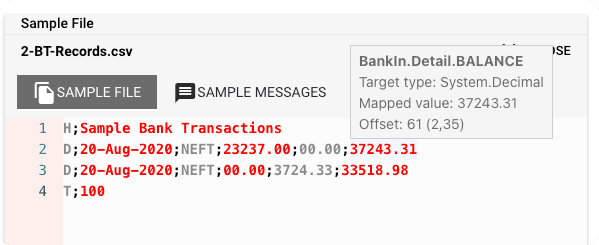
Example data of a simple Bank Transaction log:
H;Sample Bank Transactions
D;20-Aug-2021;NEFT;23237.00;00.00;37243.31
D;21-Aug-2021;NEFT;00.00;3724.33;33518.98
T;100
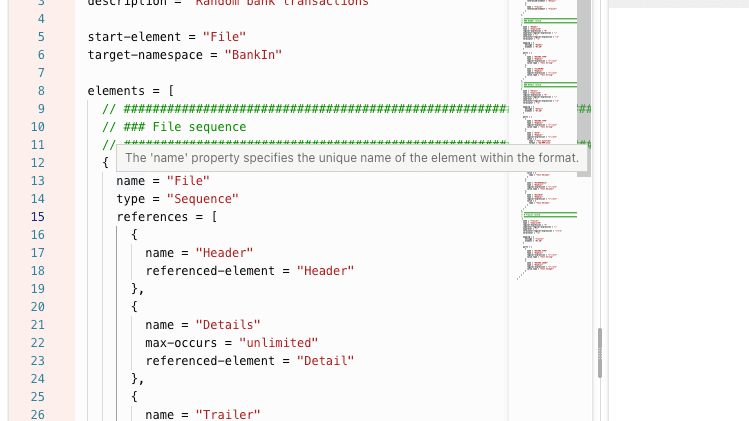
And here is how this format defined within layline.io using the generic grammar language:
format {
  name = "Bank Transactions"
  description = "Random bank transactions"

  start-element = "File"
  target-namespace = "BankIn"

  elements = [
    // File sequence
    {
      name = "File"
      type = "Sequence"
      references = [
        { name = "Header", referenced-element = "Header" },
        { name = "Details", max-occurs = "unlimited", referenced-element = "Detail" },
        { name = "Trailer", referenced-element = "Trailer" }
      ]
    },
    // Header record
    {
      name = "Header"
      type = "Separated"
      regular-expression = "H"
      separator-regular-expression = ";"
      separator = ";"
      terminator-regular-expression = "\n"
      terminator = "\n"
      mapping = { message = "Header", element = "BT_IN" }
      parts = [
        { name = "RECORD_TYPE", type = "RegExpr", regular-expression = "[^;\n]*", value.type = "Text.String" },
        { name = "FILENAME", type = "RegExpr", regular-expression = "[^;\n]*", value.type = "Text.String" }
      ]
    },
    // Detail record
    {
      name = "Detail"
      type = "Separated"
      // ... similar structure
    },
    // Trailer record
    {
      name = "Trailer"
      type = "Separated"
      // ... similar structure
    }
  ]
}
The format element
Everything starts with the top-level format element:
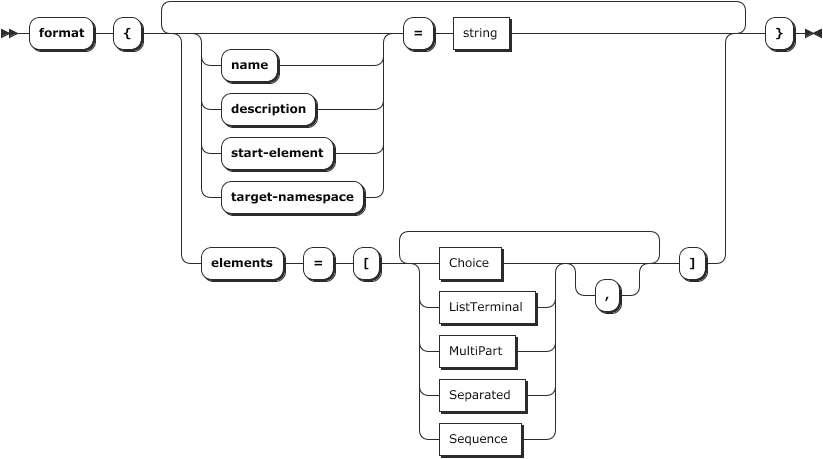
Besides a name and description, it also has an array of elements. These elements define a number of sub-elements (classes), which can be of different types.
The File element of type Sequence
This element defines a logical structure of sub-elements in its references structure:
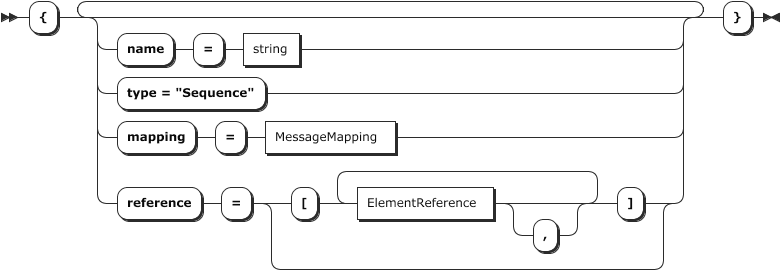
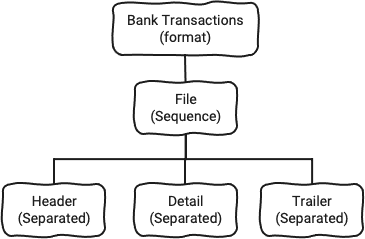
You may be able to tell that we are building a tree here:
Preliminary conclusion
We have learned that the way the grammar language works, is as follows:
- A grammar consists of a number of elements
- These elements come in different types which serve distinct purposes
- The initial element is
formatwhich points to a starting element - You can define any number of additional elements
- Some elements can then reference other elements
How about other, more complex formats?
Here is what else works:
- Very complex ASCII/Unicode formats
- Conditional data parsing through managing conditional parser state
- Binary structures
- A mix of ASCII and binary formats
We believe this covers more than 80% of all data interchange formats.
Multiple Format Support
You can define as many formats as you like. layline.io compiles all of them into a "super-format" at runtime. This allows you to:
- reference all formats from anywhere
- map data from one format to another
- create new message instances based on a specific format
- ingest or output data in any of the defined formats
Where do I actually configure all of this?
We have provided a nice user interface to help you get all the configuration done. You can find it in the layline.io web-based Configuration Center under Project --> Formats --> Generic Format:
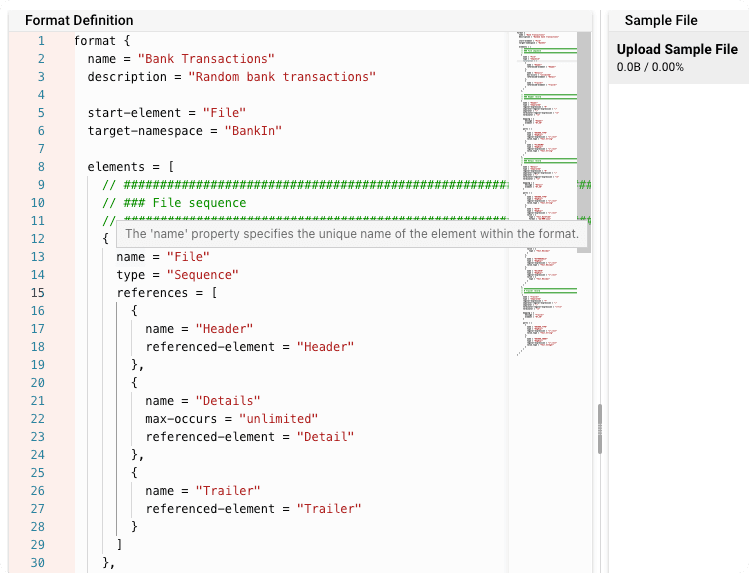
And it does not stop there. While you are defining your grammar, you can upload a sample data file, and see side-by-side whether your grammar matches the data file structure:
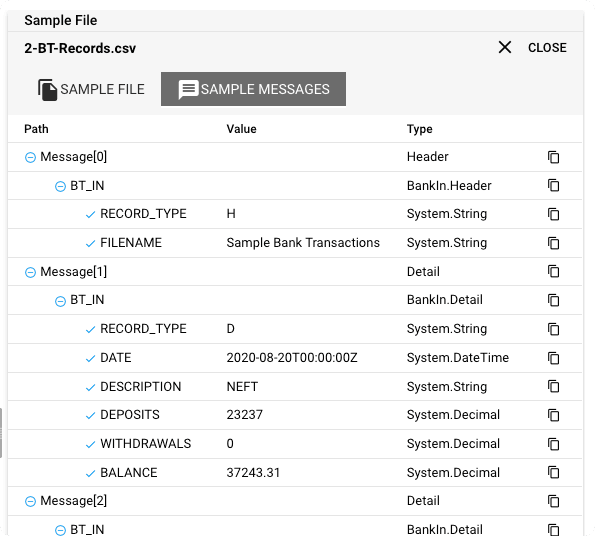
Pretty cool, eh?
Referencing Data within Logic
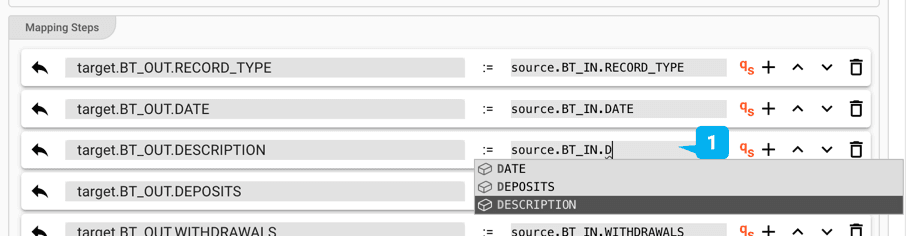
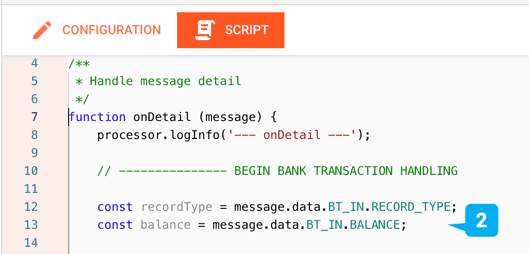
Once you have defined one or more grammars within layline.io, you can then access individual elements and structures within it:
Example: Data Access within Mapping Asset
Example: Data Access within Javascript Asset
Dealing with Format Changes
Looking back at the challenges which we talked about at the beginning, it should now be clearer how easy it is to adapt to format changes.
- Need another field? Just add it to the grammar.
- Need another whole record structure? Again, just add it to the grammar.
- Need to accommodate an old and a new version of a Detail record both at the same time? Easy: You can insert a
Choiceelement to allow for either aDetail-OldorDetail-Newversion. - Need to calculate content based on other content? Just add formulas.
It's all taken care of.
Resources
| # | Description |
|---|---|
| 1 | Documentation: Getting Started |
| 2 | Documentation: Generic Format Asset |
| 3 | Sample Project: Output to Kafka |
- Read more about layline.io here.
- Contact us at hello@layline.io.